

WordPress Site Hacked: Lets fix it
Table of Contents
When your WordPress site falls prey to hackers, it’s natural to feel a surge of panic. In this guide, I’m here to walk you through recognizing a hack, cleaning up your site, and bolstering its defenses for the future.
Let’s also explore strategies to shield your WordPress site from future breaches.
Are you ready? Inhale deeply, and let’s embark on this journey.
Compromised WordPress: Indications of Vulnerability
Unexpected behaviors on your WordPress site can be alarming. But how can you be certain it’s been hacked? Here are clear indicators your site might be compromised:
- You can’t login to your website..
- Uninitiated changes appear on your site (e.g., a new homepage or unexpected content).
- Your website unexpectedly redirects visitors.
- Browsers alert you or your users to potential security risks when visiting your site.
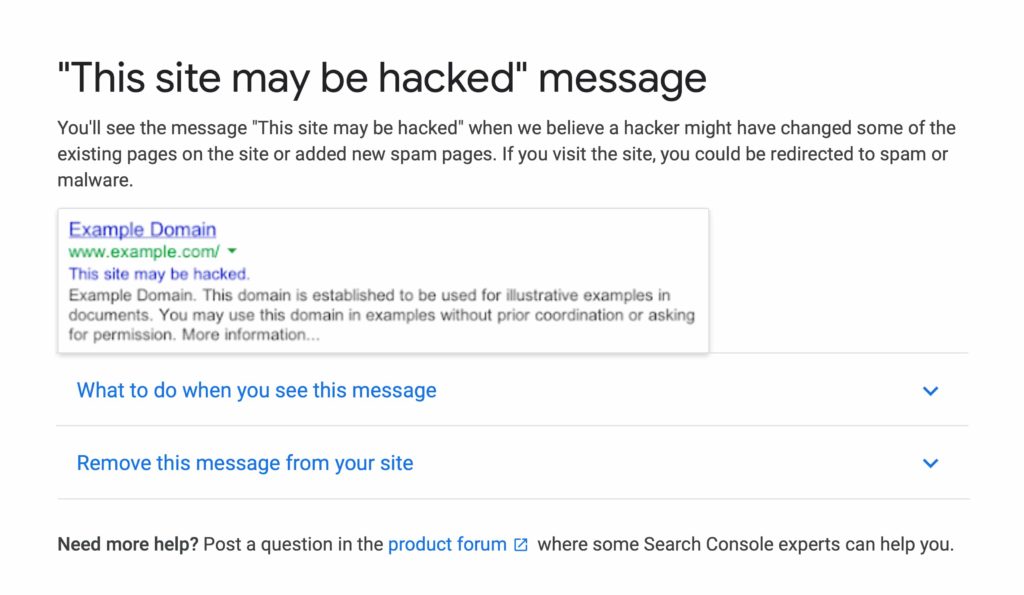
- Search engines like Google issue warnings about your site being compromised.
- Your security plugin alerts you to potential breaches or changes.
- Your web host notifies you of strange activity in your account.
Let’s delve deeper into each sign.
Inability to Access Your Site Struggling to log into your WordPress could hint at a breach. First, rule out the possibility of a forgotten password. If resetting your password fails, it could indicate unauthorized access or deletion of your account.
Unwanted Site Alterations Hackers may alter your homepage or add undesirable content. Look out for unfamiliar changes, especially if they don’t align with your selected theme.
Ensure any unexpected modifications weren’t mistakenly made by other administrators or due to a recent theme update from an unverified source.
Unexpected Site Redirection Hackers may inject scripts that redirect your visitors to other websites, often to sites you wouldn’t endorse.
I encountered this when managing a school’s website that began redirecting to a dating site, leading to an immediate need for action and a hosting provider switch to resolve the issue.
Browser and Search Engine Alerts Warnings from browsers or search engines about your site’s security can indicate hacking. These may relate to your site’s code, SSL issues, or a compromised sitemap affecting how your site is indexed.
Enhancing Your WordPress Site’s Security
WordPress sites can be vulnerable to attacks for several reasons. Here are common vulnerabilities:
- Weak Passwords: Simple passwords can easily be exploited.
- Outdated Software: Neglecting updates for WordPress, plugins, and themes can leave your site at risk.
- Vulnerable Code: Using themes or plugins from unreliable sources can introduce security risks. Always opt for verified sources and be cautious with premium plugins offered for free on untrusted sites.
Common Hacking Pathways Understanding how WordPress sites are compromised can help you safeguard your site:
- Backdoors: Bypassing standard access to infiltrate your site.
- Pharma Hacks: Injecting malicious code into outdated WordPress versions.
- Brute-force Attempts: Automating password guesses to gain site access.
- Malicious Redirects: Using backdoors to redirect your site visitors.
- Cross-site Scripting (XSS): Inserting harmful scripts through plugin vulnerabilities.
- Denial of Service (DoS): Exploiting site code errors to render a site inoperable.
For ecommerce sites, securing your platform is crucial to prevent fraud.
Recovering from a WordPress Hack: A Step-by-Step Approach
If your site is hosted with Hostking, you’re covered with our Imiunify360 Protection Service. Otherwise, you may need to tackle some steps independently.
Here’s a comprehensive plan to regain control of your hacked site:
- Remain Calm: Keeping a level head is essential for effective problem-solving.
- Enable Maintenance Mode: Hide the compromised state of your site from visitors.
- Password Overhaul: Change all related passwords to cut off hacker access.
- Plugin Assistance: Utilize tools like Wordfence for scanning and repairing your site.
- Update Everything: Ensure all your software is current to close security loopholes.
- User Review: Remove any unauthorized user accounts.
- File Cleanup: Delete any suspicious files and review your sitemap for anomalies.
- Software Reinstallation: Refresh your themes, plugins, and WordPress core if needed.
- Database Cleanup: Ensure your database is free from malicious entries.
Using Wordfence Plugin to clean your website
Fixing a hacked site has become easier with a tool we highly recommend every WordPress site should have called Wordfence Security. Its free and can and should be installed via plugins in your WordPress dashboard.
Install it via plugins
Go to Wordfence options be sure to select the options to scan plugins and theme folders. And if you want be extra careful try the option to scan outside the main directory too. Could be risky so make a backup before attempting the last option. But its not let us down doing it on many websites before.
In your WordPress Dashboard and run a full wordfence scan. If it finds anything you can choose to restore the original which should resolve the issue.
Basically select Select Bulk Repair files and Repair them.
For those that cannot be repaired check that the files are not critical ones and do a Bulk Delete if necessary.
Preventing Future WordPress Hacks
After addressing the immediate crisis, it’s vital to fortify your site’s security:
- Strengthen Passwords: Ensure all site-related passwords are robust and secure.
- Stay Updated: Regularly update all site components to patch vulnerabilities.
- Secure Downloads: Only use trusted sources for themes and plugins.
- Regular Cleanup: Remove unused themes, plugins, and files to minimize risk.
- Implement SSL: Secure your site with SSL encryption.
- Choose Quality Hosting: Avoid shared hosting environments prone to security risks.
- Firewall Protection: Implement a firewall through security plugins or services like Cloudflare to enhance defense mechanisms.
- Security Plugins: Install security plugins to monitor and protect your site. These can alert you to suspicious activities and help block unauthorized access.
- Security Services Consideration: For those not using Hostking, consider employing a dedicated security service like Sucuri. These services provide continuous monitoring and will repair your site if it’s compromised, offering peace of mind and saving you from the hassle of manual cleanups.
- Firewall Protection**: Implement a firewall through security plugins or services like Cloudflare to enhance defense mechanisms.
- Security Plugins: Install security plugins to monitor and protect your site. These can alert you to suspicious activities and help block unauthorized access.
- Security Services Consideration: For those not using Hostking, consider employing a dedicated security service like Sucuri. These services provide continuous monitoring and will repair your site if it’s compromised, offering peace of mind and saving you from the hassle of manual cleanups.
Key Takeaways and Moving Forward
Experiencing a hack can disrupt your online presence and have tangible effects on your business or personal brand. To recover and secure your WordPress site, it’s crucial to:
- Update and strengthen passwords across the board.
- Keep all site components, including plugins and themes, up to date.
- Audit and clean up user accounts and files.
- Consider a fresh installation of themes, plugins, and the WordPress core as needed.
- Perform thorough database cleanups to remove any remnants of the hack.
By proactively following the preventive measures outlined above, you can significantly reduce the risk of future hacks, ensuring your site remains secure and operational.
Maximize Efficiency and Security
Invest in WordPress plans that offer not just hosting but integrated security features. With enterprise-level integrations such as malware protection and advanced caching, you can enhance your site’s performance while ensuring its security. Opt for plans that provide a hassle-free experience, from migration support to guaranteed hack repairs, all backed by a commitment to keeping your site safe and fast.
Choosing the right plan involves understanding your site’s specific needs and ensuring the hosting provider aligns with those requirements, offering both security and performance optimizations tailored to WordPress.
As you move forward, remember the importance of vigilance and ongoing maintenance in safeguarding your WordPress site. By staying informed and proactive, you can enjoy a secure online presence, free from the disruptions and challenges of site hacks.